Dear Mr/Mrs Moderator.
This blog is now complete and ready for your assessment.
Thursday, 10 March 2011

Complete Blog
July 2010:
Lip syncing video - Reinterpretation of pop video and lip sync experiment - gaining experience with Adobe Premier Pro and the Panasonic DV digital Cameras.
Lip syncing video - Reinterpretation of pop video and lip sync experiment - gaining experience with Adobe Premier Pro and the Panasonic DV digital Cameras.
August 2010:
Lip syncing video - the targets I created and the targets I met.
Lip syncing video - the targets I created and the targets I met.
September 2010:
Video Skills Audit - What skills I thought I would need for the following year.
November 2010:
Research and Planning - Research into music videos belonging to a similar genre, introduction to narrative theory in music video.
December 2010:
Research and planning - Research into locations, actors and initial digipack research.
Research and planning - Research into locations, actors and initial digipack research.
February 2011:
Final Productions - Final music video, and the start of my evaluation
March 2011:
Evaluation.
Sunday, 6 March 2011
Evaluation : Question 4 - How did you use media technologies in the construction and research, planning and evaluation stages?
In this day and age, we are surrounding by an almost ridiculous amount of technology. We have something for everything, and I'm a firm believer that with the right technology you can create anything.
Cameras
- Panasonic DV digital camera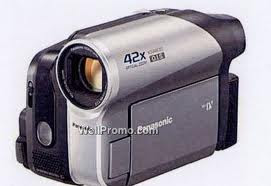 I had to use this camera to shoot my music video, even though I hoped to be in contact with the HD camera, as for some of my shots with the bright sunshine. I wanted to be able to pick it up in a way that wasn't distorted. Unfortunatly there were limited numbers, so I did the best I could with the Panasonic. I really learnt how to get the best out of this camera, in terms of zooming, and positioning it in a way where the lighting is perfect.
Computer Software
- Premiere Pro (Adobe)
I had used premiere a few times in my first year at college, and n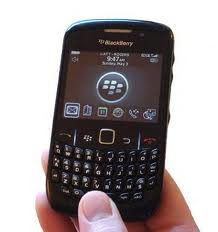
In relation to technological determinism, I definitely think that the lack of new technology hindered my final product. If I for example had gotten hold of a HD camera, I would of been able to produce something of a higher quality, and I think that i would of been a lot more inspired by what my camera was capable. But I also think that I worked well with what I had, and I wasnt exactly stumped at the lack of good technology.
Cameras
- Panasonic DV digital camera
I had to use this camera to shoot my music video, even though I hoped to be in contact with the HD camera, as for some of my shots with the bright sunshine. I wanted to be able to pick it up in a way that wasn't distorted. Unfortunatly there were limited numbers, so I did the best I could with the Panasonic. I really learnt how to get the best out of this camera, in terms of zooming, and positioning it in a way where the lighting is perfect.Computer Software
- Premiere Pro (Adobe)
I had used premiere a few times in my first year at college, and n
ever before, before that so my knowledge about it was very basic. All I could do was import a video clip into the software and then cut each clip down. I wasn't away of all the other things i can now do, like rendering for example, and video effects and transitions. Whilst I was filming, I very stupidly shot some of my clips in a portrait view, when it should of all been in a landscape view. But thanks to premiere I could rotate my clips on the timeline to make them fit back into the rest of my video. Without this software I most definitely would not of created the video I did.
- Onlocation (Adobe) This link into Premiere Pro alot, as i had no idea what this software was untill I came across it to use it. But I managed to use it to import and record all the clips i needed to edit.
Websites
- Youtube
Youtube is one of those sites that i had been using for a number of years prior to this project, but never been able to upload my own videos onto. I managed to create a succesfull youtube account, something which took me many tries, and then upload and share my music video.
- Facebook
Again this is something that I've been using for a long time, but never to its full potential. Thanks to things like status's and sharing videos I was able to create a set of auidence feedback results that really helped me to evaluate my video, and see whether I had something succesfull.
Phones
- Onlocation (Adobe) This link into Premiere Pro alot, as i had no idea what this software was untill I came across it to use it. But I managed to use it to import and record all the clips i needed to edit.
Websites
- Youtube
Youtube is one of those sites that i had been using for a number of years prior to this project, but never been able to upload my own videos onto. I managed to create a succesfull youtube account, something which took me many tries, and then upload and share my music video.
Again this is something that I've been using for a long time, but never to its full potential. Thanks to things like status's and sharing videos I was able to create a set of auidence feedback results that really helped me to evaluate my video, and see whether I had something succesfull.
Phones
-Blackberry
On my blackberry I was able to log into my blog whenever I wanted to, I was able to check my emails and calender to make sure i was keeping up to date on my time plan, I was able to get onto facebook to check any video responses, and I was also able to play the song through websites like youtube and myspace If i needed be.
On my blackberry I was able to log into my blog whenever I wanted to, I was able to check my emails and calender to make sure i was keeping up to date on my time plan, I was able to get onto facebook to check any video responses, and I was also able to play the song through websites like youtube and myspace If i needed be.
In relation to technological determinism, I definitely think that the lack of new technology hindered my final product. If I for example had gotten hold of a HD camera, I would of been able to produce something of a higher quality, and I think that i would of been a lot more inspired by what my camera was capable. But I also think that I worked well with what I had, and I wasnt exactly stumped at the lack of good technology.
Evaluation ; Question 3 - What have you learnt from your audience feedback?
This is a slideshow just showing the comments I recieved from my A2 Media Class when we all had the chance to watch each others videos.
Negative Comments
- The video became boring without any lip synching or performance
This was a comment that I got from one person out of over 2o people, which makes it hard for me to distinguish what I feel is negative about the video and what others think about the video. While I'm grateful that my video didn't recieve alot of negative comments, the classroom feedback won't help me to evaluate what I could of improved on. But taking into consideration this one persons comment, I do agree that the video seems to almost drag on and become slightly boring as we watch it. If I were to hypothetically change it, then I think I would add more entropy, and spice up the stroyline slightly. I might of changed the tempo slightly aswell, just to keep it at a pace where it keeps the whole audience in attention.
Positive comments
- Good Match on Actions
- Good Narrative
- Great performance and choice of performer
- Good editing (slow motion effect)(Mise en scene)(Framing and angles)
- Good range of Cinamatography
- Suited the Genre of the music
- Varied shots and Locations
- Good lighting (not too bright, not too dull)
In all fairness I did not expect so much positive feedback on this video, as I almost disagreed with all of their comments. But in hearing what people really thought about it I feel as though they opened my eyes and let me see my video properly. I did do well on the match on actions, especially the shot where the girl hides under the dressing gown. The comment about the lighting suprised me slightly as I didn't even think about the lighting too much as I shot my video, except to make sure that you could actually see the performance. So for someone to say it worked really well was a good thing. The fact that they agreed that the lip sycnhing wasn't needed and the narrative itself worked without it was a huge relief for me, as I was worried that as I did my audience would find it boring too. But thankfully thats not been the case.
Negative Comments
- The video became boring without any lip synching or performance
This was a comment that I got from one person out of over 2o people, which makes it hard for me to distinguish what I feel is negative about the video and what others think about the video. While I'm grateful that my video didn't recieve alot of negative comments, the classroom feedback won't help me to evaluate what I could of improved on. But taking into consideration this one persons comment, I do agree that the video seems to almost drag on and become slightly boring as we watch it. If I were to hypothetically change it, then I think I would add more entropy, and spice up the stroyline slightly. I might of changed the tempo slightly aswell, just to keep it at a pace where it keeps the whole audience in attention.
Positive comments
- Good Match on Actions
- Good Narrative
- Great performance and choice of performer
- Good editing (slow motion effect)(Mise en scene)(Framing and angles)
- Good range of Cinamatography
- Suited the Genre of the music
- Varied shots and Locations
- Good lighting (not too bright, not too dull)
In all fairness I did not expect so much positive feedback on this video, as I almost disagreed with all of their comments. But in hearing what people really thought about it I feel as though they opened my eyes and let me see my video properly. I did do well on the match on actions, especially the shot where the girl hides under the dressing gown. The comment about the lighting suprised me slightly as I didn't even think about the lighting too much as I shot my video, except to make sure that you could actually see the performance. So for someone to say it worked really well was a good thing. The fact that they agreed that the lip sycnhing wasn't needed and the narrative itself worked without it was a huge relief for me, as I was worried that as I did my audience would find it boring too. But thankfully thats not been the case.
Responses on Film
I thought that for my filmed response, I would choose someone that will tell me the truth, but also somebody who doesn't know the bands music, so won't have a preconcieved idea of what a music video for them SHOULD look like. In asking somebody outside of my audience to comment on my video I believe that it will be a chance for me to get some real constructive critism. So the person I've chosen to film is my mum, Nicolette Platt. She's somebody who has always told me the truth in all the work I do, so somebody I expect to give me something to work with. She's 38, she's a three times married single mum, and she currently listens to alot of music. She's not really interested whats on the scene, rather than listening to bands she likes the sound of. So for this reason I thought, even though it seems like I didn't make too much of an effort to find somebody to film, that she would be a perfect example!

Positive Comments:
Negative Comments:
Facebook Responses.
Facebook is the social network that everybody has at least heard of, and alot of people from across the world use from an hourly basis. It is defininetly a great idea to ask for feedback on your music video aswell, as so many people will get the chance to see it and comment. Especially people of my direct audience.
After posting my video onto youtube, I was able to get the URL and post it as a status onto facebook, so that everybody that I'm friends with, including people who are actually friends with the band itself, could see my video. Instead of asking a set of questions, I decided to trust my audience and simply asked them to tell me what they did like, and what the didn't like about my music video.
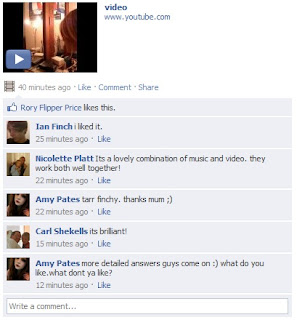
This is a print screen showing some of the initian responses I got off people at first. It seemed that people were not really interested in watching it. But thankfully more and more people wrote their opinions, in a way that was more constructive than my Class response.
Facebook is the social network that everybody has at least heard of, and alot of people from across the world use from an hourly basis. It is defininetly a great idea to ask for feedback on your music video aswell, as so many people will get the chance to see it and comment. Especially people of my direct audience.
After posting my video onto youtube, I was able to get the URL and post it as a status onto facebook, so that everybody that I'm friends with, including people who are actually friends with the band itself, could see my video. Instead of asking a set of questions, I decided to trust my audience and simply asked them to tell me what they did like, and what the didn't like about my music video.

This is a print screen showing some of the initian responses I got off people at first. It seemed that people were not really interested in watching it. But thankfully more and more people wrote their opinions, in a way that was more constructive than my Class response.
Negative Comments
- The shots were a bit jumpy in some parts
- Slightly boring narrative
- Not enough memory shots
- Would of been nice to see the boys face in the main parts of the video
From this I noticed that these people were right about my video, and they pointed out a couple of things I didn't think about before or whilst shooting my video. For example somebody commented that it would of been a good idea to see the boys face in the main parts of the video, rather than just the memory shots. The reason that I did this though, was because I wanted the whole focus to be on the girl, and for the shots of him walking up the stairs its mainly because I wanted to create a sense of suspense of not knowing who was walking up to her room. I do agree though, as it might of added a touch more emotion to the narrative if we'd of ended up with a shot of his face. I also agree with the comment about the shots being slightly jumpy in parts of the video, as the close up of her brushing her hair doesn't fit smoothly into the side view shot of her brushing her hair. Maybe if I'd of editing the clips a bit more sharper it would of fit in smoother. If I were to go by these comments and change my video, I think that the portrayal of the main boy character would be made more suspenseful, as this way the audience wouldn't need to question the fact his face is hidden as they wouldn't be able to guess who it was anyway, and I'd also make sure my editing of the clips were perfect, to improve the viewing pleasure for the audience.
Summary of all my feedback
When I first mapped out the idea's for my video, I had so many different visions that I'm suprised that I managed to create something that so many people had something positive to say about. I wanted to create a typical atmosphere to my video, although adding a slight entropic feel to it with the sense that I wouldnt be adding lip syncing. i also wanted to create a very solemn, yet hopeful feel to the video, in the sense that you could feel sympathy for the girl, but feel hopeful that shes going to be okay in the shots where the boy appears. Adding the effects like no lip synching I hoped would attract a niche audience, and the kind of audience who wouldn't be so interested in the music as opposed to the kind of video it was, but at the same time adding in all the generic and typical aspects of a music video for this genre of music as to attract the main, target audience. I also wanted it to be realistic, and simplistic for the fact that it would make the narrative become easy to follow, and this was nessacary due to the fact I had to lip synching planned. According to my audience, they didn't need a performance, as the narrative was enough to keep them entertained. Although a few strays argued that it could be concieved as boring, I think thats because they had an abberant view on the the no performance aspect.
- The shots were a bit jumpy in some parts
- Slightly boring narrative
- Not enough memory shots
- Would of been nice to see the boys face in the main parts of the video
From this I noticed that these people were right about my video, and they pointed out a couple of things I didn't think about before or whilst shooting my video. For example somebody commented that it would of been a good idea to see the boys face in the main parts of the video, rather than just the memory shots. The reason that I did this though, was because I wanted the whole focus to be on the girl, and for the shots of him walking up the stairs its mainly because I wanted to create a sense of suspense of not knowing who was walking up to her room. I do agree though, as it might of added a touch more emotion to the narrative if we'd of ended up with a shot of his face. I also agree with the comment about the shots being slightly jumpy in parts of the video, as the close up of her brushing her hair doesn't fit smoothly into the side view shot of her brushing her hair. Maybe if I'd of editing the clips a bit more sharper it would of fit in smoother. If I were to go by these comments and change my video, I think that the portrayal of the main boy character would be made more suspenseful, as this way the audience wouldn't need to question the fact his face is hidden as they wouldn't be able to guess who it was anyway, and I'd also make sure my editing of the clips were perfect, to improve the viewing pleasure for the audience.
Summary of all my feedback
When I first mapped out the idea's for my video, I had so many different visions that I'm suprised that I managed to create something that so many people had something positive to say about. I wanted to create a typical atmosphere to my video, although adding a slight entropic feel to it with the sense that I wouldnt be adding lip syncing. i also wanted to create a very solemn, yet hopeful feel to the video, in the sense that you could feel sympathy for the girl, but feel hopeful that shes going to be okay in the shots where the boy appears. Adding the effects like no lip synching I hoped would attract a niche audience, and the kind of audience who wouldn't be so interested in the music as opposed to the kind of video it was, but at the same time adding in all the generic and typical aspects of a music video for this genre of music as to attract the main, target audience. I also wanted it to be realistic, and simplistic for the fact that it would make the narrative become easy to follow, and this was nessacary due to the fact I had to lip synching planned. According to my audience, they didn't need a performance, as the narrative was enough to keep them entertained. Although a few strays argued that it could be concieved as boring, I think thats because they had an abberant view on the the no performance aspect.
The preferred reading I would of had of my video is:
- Displaying a typical/unusual relationship between a male and a female
- Showing of a stereotypical woman (feeble, weak, unprotected)
- A solemn atmosphere and relationship between the audience and viewer
In recieving my audience feeback I'm satisfied that i chose my audience well, and that the majority had the right cultural capital to understand why I didn't use lip synching in the video. I was succesful in portraying the relationsip between the two characters aswell, which proves that its not something redundant but not something so entropic that people loose what they are looking at. Overall I'm very happy with the way people read my video.
In recieving my audience feeback I'm satisfied that i chose my audience well, and that the majority had the right cultural capital to understand why I didn't use lip synching in the video. I was succesful in portraying the relationsip between the two characters aswell, which proves that its not something redundant but not something so entropic that people loose what they are looking at. Overall I'm very happy with the way people read my video.
Monday, 28 February 2011
Friday, 11 February 2011
Thursday, 3 February 2011
Time plan - So far
I've managed to cast my actors well, and got permission from those responsible to use these characters. So Far the filming is going up to date, I have managed to capture all of my clips of the 'flashbacks and memories'. I've managed to put these onto a time line roughly of where I think they will go in the final video. All I need to include now is my main performance, which is of the girl sitting on her own, lip syncing a few of the lyrics to just make sure the song really relates to the video itself. I might have to re shoot some of the flashback clips as i think at the moment its not incredibly clear what is going on.
Monday, 13 December 2010
Research and Planning : Digipack Designs
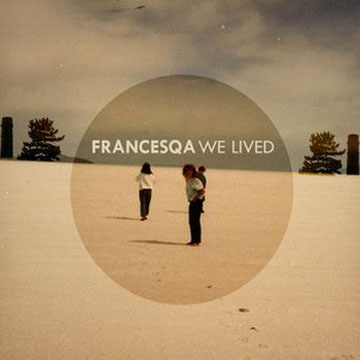
This is the example of the bands own CD digi pack design. I really love the simplicity of the CD, and I think its definitely something I want to incorporate in my own.

This is an example of a digipack design that I really liked that I found on the internet in a basic google search. I love the way it has a theme, for example the white faces on the poeople are continued throughout all of the pictures on the design. I think it looks more professional, and definatly a more eye catching tenchique. For my own design I'll definatly keep to one theme, for example keeping the pictures relevant.
Change of Song!
My original artist has proved difficult to properly get in touch with, as he promised to send me his mp3, and lyrics to the song I needed (Origami) As after many non-respondent emails have been sent from my end, I've chosen to cut my losses and change the song. This way I can finally create proper idea of what I need to do. My chosen song now is called 'Boy' and its by a band called Francesqa. This song is relatively similar to the concepts of the other song, and I can rearrange my old ideas into this.
http://lyrics.duble.com/boy-lyrics-francesqa.html
These are the lyrics
http://www.facebook.com/Francesqa
These are them on facebook

http://lyrics.duble.com/boy-lyrics-francesqa.html
These are the lyrics
http://www.facebook.com/Francesqa
These are them on facebook

Research and Planning : Magazine Adverts

This is to show the type of information I would need to put on my advertisement. I'm going to need the release date, the name of the artist, the name of the song or album, promoting the music video, e.g. 'Origami' with music video, and also quotes from magazines.

This 'poster' is just an example of the kind of colours I would use for my advert. While its not very striking I think it looks stunning. I love the fonts used, and I like how they have used a logo as the source of colour.
Research and Planning : Digipack

This front cover is definitely the kind of image I want for my design. I like the use of the establishing shot to include more of the setting, and I love how the main characters face is hidden with his cap. I think though that if I used this type of design, then my main character would be way further back, and I wouldn't hide him with an object, I would use lighting to create a shadow across his face.

I found this image and thought that it was a really beautiful design for the back of a CD. I love how the guitar and rose almost seem intertwined and that the flowing font fits in well to the theme. The colours as well are really graceful and beautiful, and really represents what the band is about. If I were to take anything from this design it would be using the objects like the rose and the guitar to really represent my artist.

This is here just to show that the CD spine is not something in which everyone takes a lot of time to create. I like the simplicity of this design, and as its not something which will be taken notice of by a lot of buyers I would use the same simple approach.

This image is here just to show that the inside of a CD case is just as important as the outside. Its no good trying to catch the eye of the buyer with just the outside as you will loose their interest as soon as they open the CD. As you can see in this image they have kept a theme going through the inside, which I think works really well and is something I would incorporate too.
Research and Planning : Potential Cast

This person will be the main character in my video, and will do any lip syncing if needed. He is reliable because he is male, and this makes more sense as my artist is a male as well. He fits perfectly into my target audience, and I know that he will enjoy the type of video I want it to be. He is also an aspiring singer.

This person would play the female in my video, although in the idea I have I don't show much of her. So although this person wouldn't do an awful lot, she is still perfect for my character. She fits my target audience well and I know she would do the best job I would ask of her.
Role : Main Performer
Who? : Kiall Gormley
Contact Details : 07821001481
Role : Actor
Who? : Emily Probert
Contact Details : 07928414830
Role : Camera/editing/photographer
Who? : Amy Pates
Contact Details : 07530342691
On changing my song, and my idea's I realised it would become a problem to use these two people in my video, as I need the two main characters to look or at least resemble the two children I want to use. So upon thinking about this I've decided to ask other people to be in my video.

This girl is my little sister, Holly Pates. I use her in alot of the work I do, as she proves to listen to exactly what I say, and she likes the attention of a camera, whether it be still or moving. Shes a petite girl, and she has medium length blonde hair. She is the perfect type of girl I think to use in my video, as the girl has to be cute, but not in a baby kind of way. Another plus is that as she is my sister, I can control when she can be summoned to film, or photograph etc.

This is my brother, Brandon Pates. Again he is someone I use in alot of the work I do. He isn't as outgoing as my sister, but after he feels comfortable he will do what I ask him too. He is about 5ft 6 already at only age 13 and he has the right kind of figure I need, as he towers over my sister in a protective kind of way. Again I will be able to take control over when he can be filmed as I am responsible for him. (obviously if he gives me persmission)
Research and Planning : Print Work


These photographs of ruined interior are the types of setting I would want to have for my print work. In relation to my video I will need to use a lot of close ups to portray the emotion of the character, so in a slight contrast I want to use wide shots and establishing shots to just show in more depth the character and where he is. Also I think it would be a bit less mainstream to have a digipack where the main singer isn't the main focus. In my picture I want the character to be just as noticed as the setting.
When I came to do my print work, it was very, very difficult to find a place that look genuine and classy, instead the few places I could of used looked distasteful of photographs, so I changed my idea to their not really being a background, and just using the characters face, or bpdy as the main image.
Time Management
Audience Research
Put mood board onto Facebook to get feedback - 25/11/2010
Make any alterations to our ideas based on feedback - 28/11/2010
Print production
Analyse at least one Digipak/advert campaign - 23/11/2010
Do a brainstorm of ideas for the Digipak/advert - 25/11/2010
Pick the best ideas - 26/11/2010
Compile a minimum of three first drafts - 29/11/2010
Choose the best idea based on audience feedback - 1/12/2010
Blog why the best idea was the best - 5/12/2010
Photo shoot with the actor - 16/12/2010
Performers and Casting
Cast reliable performers for the video - 29/11/2010
Take photos of cast individually and blog - 30/11/2010
Blog why they are suitable for the video - 30/11/2010
Take photos of them in costume - 1/12/2010
Locations + health and safety
Find locations - 26/11/2010
Ask for permission to use the locations - 30/11/2010
Take test shots of the locations - 5/12/2010
Write down details of permission - 5/12/2010
Take photographs of the risks and dangers - 7/12/2010
Compile a risk assessment - 13/12/2010
Get it accepted by the college - 14/12/2010
Put that into our blog - 15/12/2010
Make sure that all cast/performers can get access to the locations - 7/12/2010
Costumes and props
Brainstorm all costume and props that we may want - 1/12/2010
Make a table of all the props/costumes that we need - 3/12/2010
Find the sources of the props/costumes - 10/12/2010
Work out the potential cost and budget - 11/12/2010
Take photos of some of the cast in costume - 14/12/2010
Take photos of costumes/props - 14/12/2010
Blog it - 16/12/2010
Choreography/movement and blocking
Work out all of the different shot types that we would like to use - 5/12/2010
Take test shots of the different shot types in chosen location - 7/12/2010
Plan camera movements - blocking - 6/12/2010
Plan performer positions - 26/12/2010
Take test shots of performers/cast positions - 27/11/2010
Shot lists and storyboarding
Draw an animatic - 15/12/2010
Put it onto youtube and include music - 16/12/2010
Upload to blog - 17/12/2010
Put mood board onto Facebook to get feedback - 25/11/2010
Make any alterations to our ideas based on feedback - 28/11/2010
Print production
Analyse at least one Digipak/advert campaign - 23/11/2010
Do a brainstorm of ideas for the Digipak/advert - 25/11/2010
Pick the best ideas - 26/11/2010
Compile a minimum of three first drafts - 29/11/2010
Choose the best idea based on audience feedback - 1/12/2010
Blog why the best idea was the best - 5/12/2010
Photo shoot with the actor - 16/12/2010
Performers and Casting
Cast reliable performers for the video - 29/11/2010
Take photos of cast individually and blog - 30/11/2010
Blog why they are suitable for the video - 30/11/2010
Take photos of them in costume - 1/12/2010
Locations + health and safety
Find locations - 26/11/2010
Ask for permission to use the locations - 30/11/2010
Take test shots of the locations - 5/12/2010
Write down details of permission - 5/12/2010
Take photographs of the risks and dangers - 7/12/2010
Compile a risk assessment - 13/12/2010
Get it accepted by the college - 14/12/2010
Put that into our blog - 15/12/2010
Make sure that all cast/performers can get access to the locations - 7/12/2010
Costumes and props
Brainstorm all costume and props that we may want - 1/12/2010
Make a table of all the props/costumes that we need - 3/12/2010
Find the sources of the props/costumes - 10/12/2010
Work out the potential cost and budget - 11/12/2010
Take photos of some of the cast in costume - 14/12/2010
Take photos of costumes/props - 14/12/2010
Blog it - 16/12/2010
Choreography/movement and blocking
Work out all of the different shot types that we would like to use - 5/12/2010
Take test shots of the different shot types in chosen location - 7/12/2010
Plan camera movements - blocking - 6/12/2010
Plan performer positions - 26/12/2010
Take test shots of performers/cast positions - 27/11/2010
Shot lists and storyboarding
Draw an animatic - 15/12/2010
Put it onto youtube and include music - 16/12/2010
Upload to blog - 17/12/2010
Tuesday, 30 November 2010

Tuesday, 23 November 2010
Subscribe to:
Posts (Atom)